- To begin, log in to the DNN site as an administrator.
- Navigate to the page with the module you need to update. Then click the pencil icon in the bottom left corner of the admin toolbar to enter edit mode.
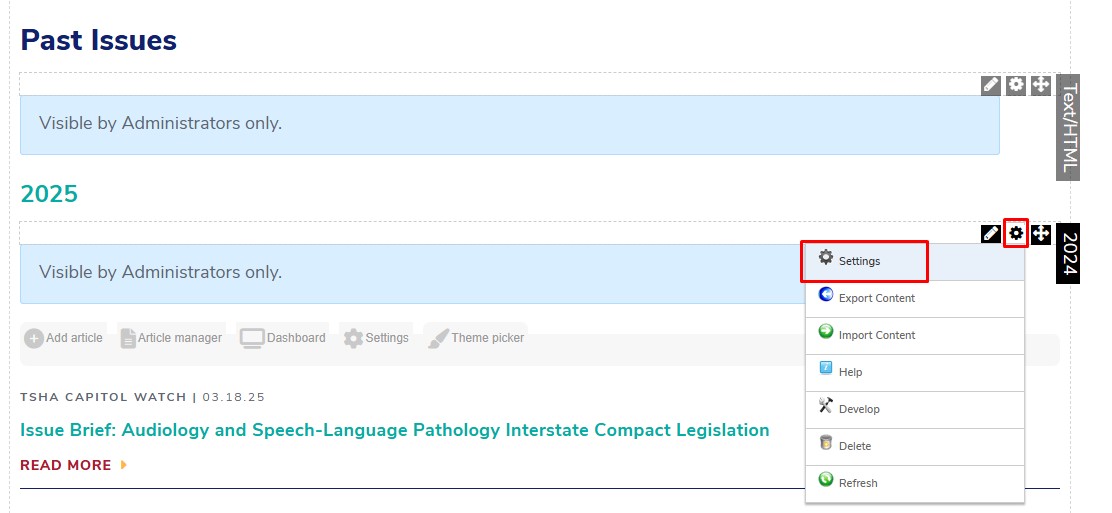
- Hover over the gear icon in the right-hand corner of the module you need to update, then click Settings
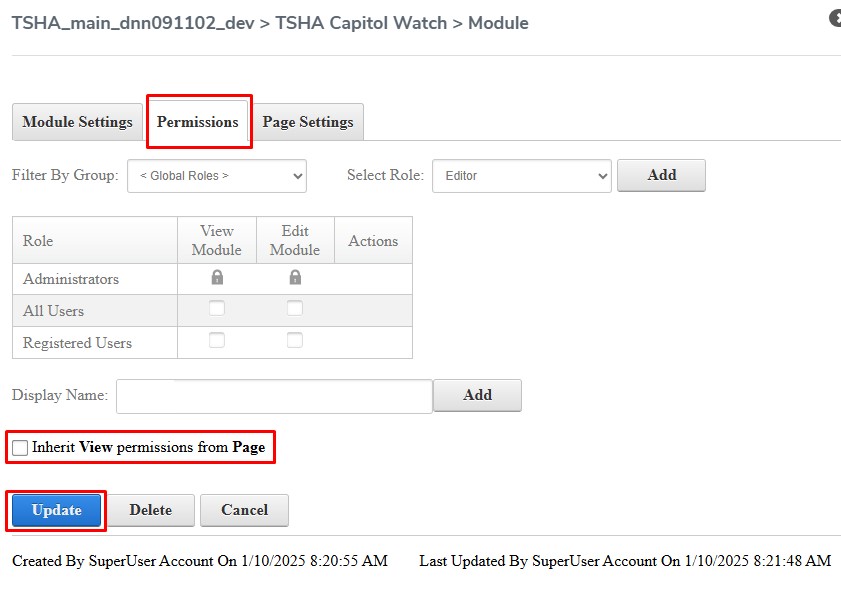
- In the popup window, click on the Permissions tab at the top, then check the box next to “Inherit View Permissions from Page” and click Update.
Notes
- If you would like to make a module “admin only” (hidden from the public), follow the same steps, but in Step 4 uncheck the box next to “Inherit View Permissions from Page” and click Update.
See attached for the PDF version of these instructions.
Was this article helpful?
That’s Great!
Thank you for your feedback
Sorry! We couldn't be helpful
Thank you for your feedback
Feedback sent
We appreciate your effort and will try to fix the article