- Log into the auth0 dashboard. From the side menu, click "Branding,” then select "Universal Login"
- Scroll to the bottom of the page. Under "Pro-code customizations," select "Core Configuration."
- Select "Classic Login", then click the Login tab
- Go to the HTML module at the bottom of the page. In the code, locate ‘initial screen’
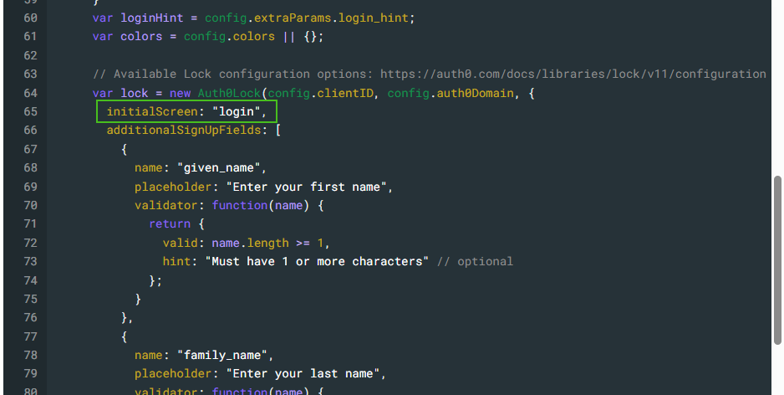
- To change the default tab to Login, enter "login" To change the default tab to Set Up an Account, enter “signUp”
- Click Save Changes underneath the HTML module to confirm update.
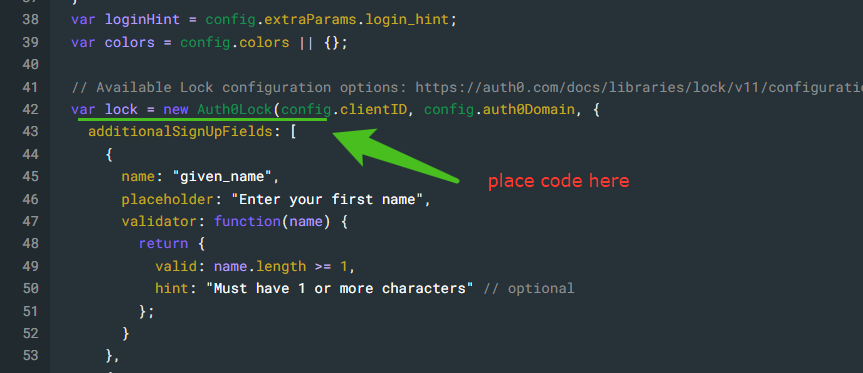
NOTE- this is a custom option and is not in the code on initial set up. This will need to be added to any new auth0 instances.
Place the code (initialScreen: "login", or initialScreen: "signUp",) directly above additionalSignUpFields: [
Was this article helpful?
That’s Great!
Thank you for your feedback
Sorry! We couldn't be helpful
Thank you for your feedback
Feedback sent
We appreciate your effort and will try to fix the article