If a page or module is accidentally deleted in DNN, the page or module can be recovered from the Recycle Bin and restored.
- To begin, log in to the DNN site as an administrator.
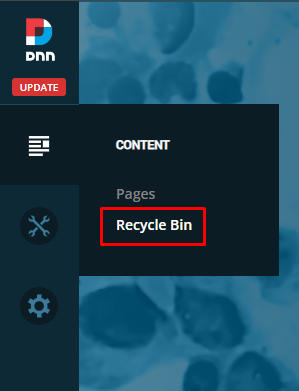
- In the left-hand admin bar hover over the Content icon and click Recycle Bin.
- In the Recycle Bin window, there are two tabs of importance at the top. One for Pages and one for Modules. Click on the tab that corresponds to the item you’d like to restore.
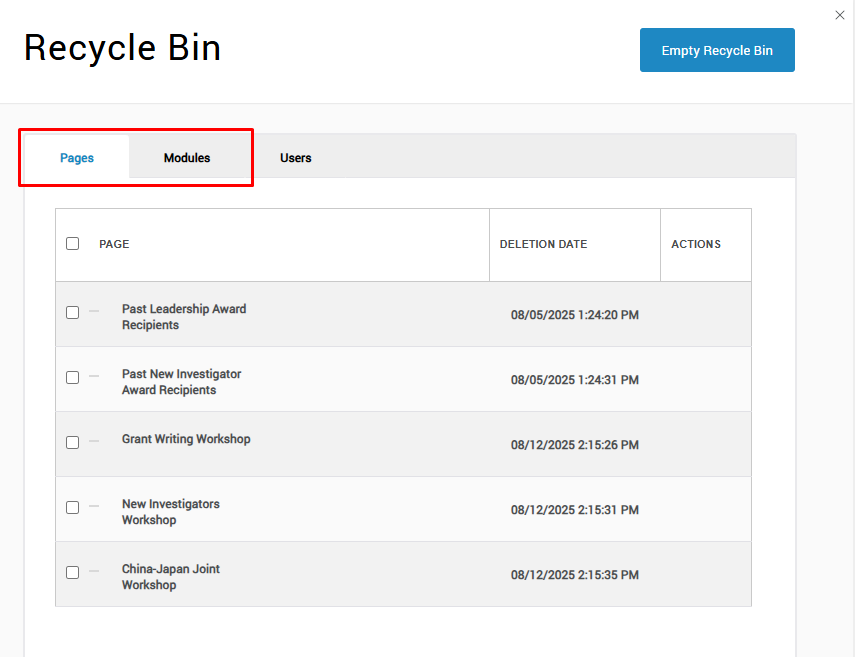
- For Pages, you will see the page name and the date it was deleted in the list.
- For Modules, you will see the module title (if it had one), the page the module was on, and the date it was deleted in the list.
- Find the page or module you want to restore in the list. Then hover over the right-hand “Actions” column and click the circular arrow icon to restore the page or module.
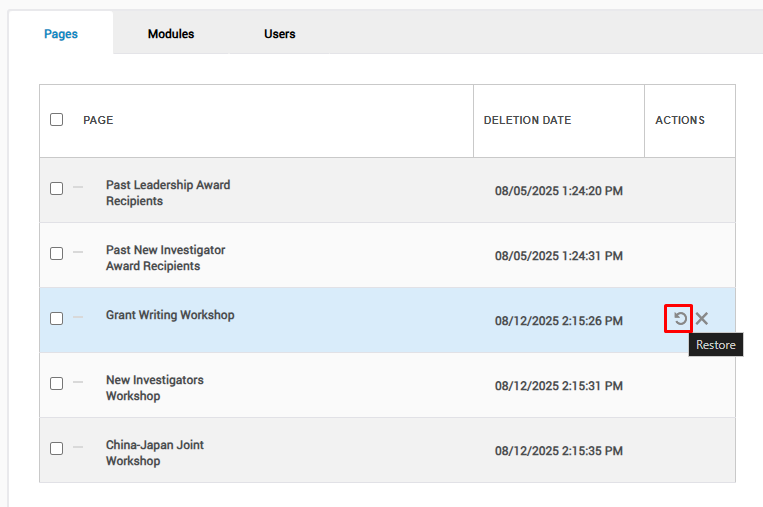
- Now you can navigate back to the restored page or the page with the restored module.
Was this article helpful?
That’s Great!
Thank you for your feedback
Sorry! We couldn't be helpful
Thank you for your feedback
Feedback sent
We appreciate your effort and will try to fix the article